Your dashboard
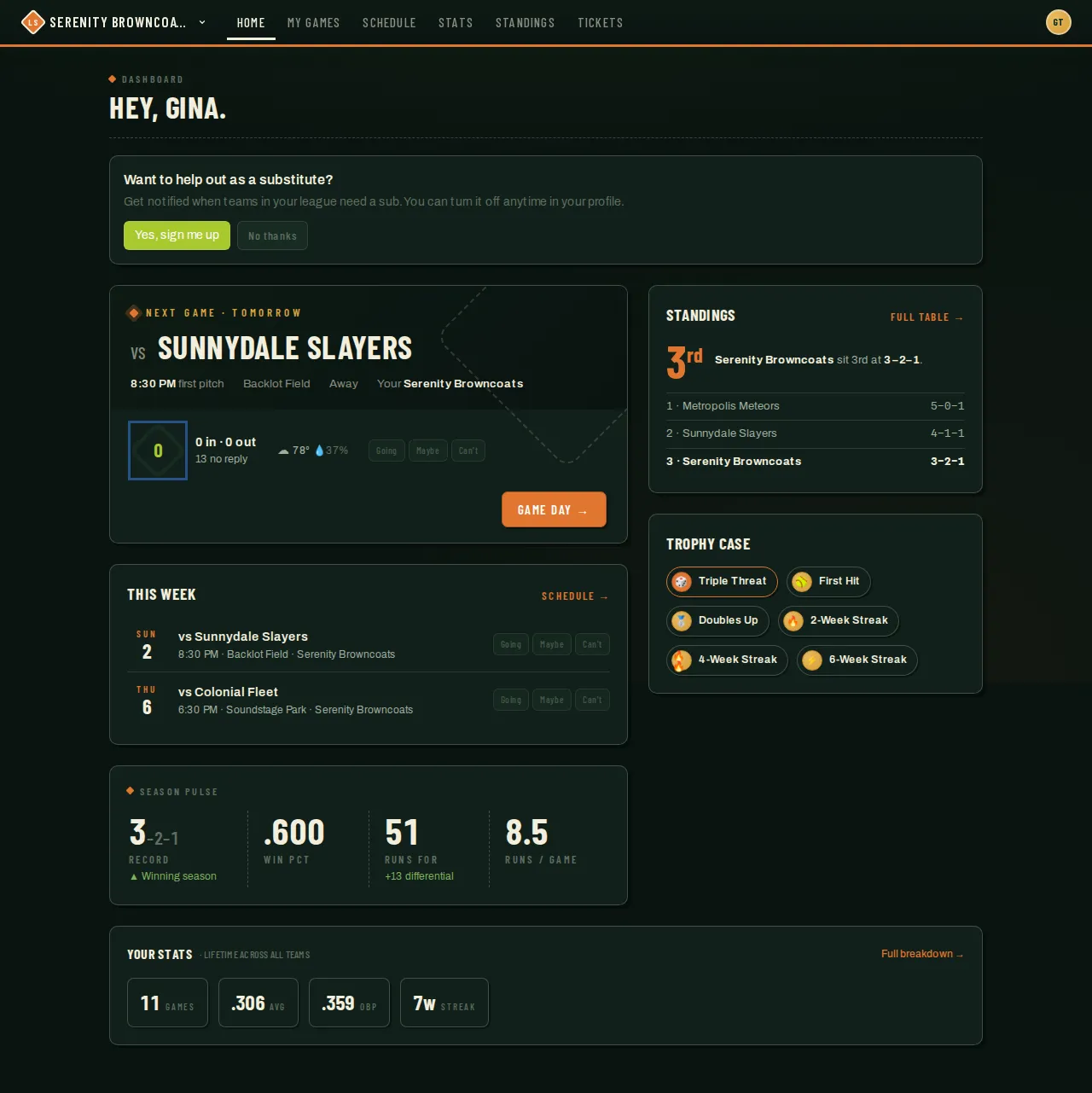
Your dashboard is the first thing you see after signing in. It’s one page that adapts to whatever teams you’re on — there’s no separate view to pick. It surfaces the one thing that matters most (your next game) and works backward from there: what’s coming up this week, how your team is doing, and a quick read on your own season.
Who can do this
Section titled “Who can do this”Anyone with an account. What you see depends on your role and which teams you’re on — coaches get extra tools like score reporting, but the layout is the same for everyone.
What you’ll see, top to bottom
Section titled “What you’ll see, top to bottom”-
A message card, if you have one. Things like a nudge to join the sub pool, a pending Player of the Game vote, or a post-game survey show up here first, one at a time. Nothing shows if there’s nothing waiting on you.
-
Your next game. The soonest game across every team you’re on, with the matchup, first-pitch time, field, and weather. It can just as well be a practice, social or scrimmage — shown by its title or kind rather than a matchup — or an organization event you signed up for. If it hasn’t started yet, tap Going, Maybe, or Can’t right there. If you’re on more than one team, this always shows whichever game is coming up soonest — not just your main team’s.
-
This Week. Every game across all your teams in the next 7 days, each with its own quick RSVP.
-
Tournaments and League News, when there’s something to show. If one of your teams is in a live tournament bracket, a card links straight to it, and Tournaments is promoted to the top navigation for as long as the tournament is live. The rest of the year you’ll find Tournaments inside the team switcher (tap your team name in the top-left), just above Past teams. And when your organization posts an announcement, the latest one appears here with a link to the full feed at /news.
On a phone, Home, Games, Messages and Profile are always one tap away in the bar at the bottom of the screen; everything else is still in the ☰ menu.
-
Useful Links, at the top of the right rail — your season’s rulebook plus any links your organization picked for the season (venue maps, schedule pages, sponsors). Nothing shows if the organization hasn’t added any.
-
Standings and Season Pulse, on the right — but only while your active team has a winning record. Losing, tied, or nothing decided yet? This spot shows your own personal stats for the season instead, so the page never dwells on a losing record.
-
Trophy Case. Badges you’ve earned, most recent first — nothing shows here until you’ve had at least one at-bat.
-
Your Stats. A lifetime summary (games, average, on-base percentage, current streak) across every team you’ve ever played for, with a link to your full stat breakdown.
Before the season starts
Section titled “Before the season starts”If your team’s next season is still signing people up and no games are on the calendar yet, the dashboard looks completely different — and that’s on purpose. Instead of the game-centric layout above, you get a pre-season view: the upcoming season at a glance (with a countdown to the start date), a personal Get ready checklist (things like paying your dues, setting your sub availability, or verifying your ID where a season requires it), and a Roster progress card showing who’s on the team so far against the season’s roster minimums. The moment a real game lands on the schedule, the normal dashboard takes over again.
Choose your positions
Section titled “Choose your positions”If you play softball or kickball and haven’t set your preferred positions, a Where do you like to play? card appears on your dashboard. It also appears while you’re waiting to be placed on a team after registering as a free agent.
Tap Choose positions to open the Playing Profile section of your profile. If you’re happy to play anywhere, tap Skip: this marks you as FILL for any sport whose positions you haven’t chosen yet. The card disappears once your preferences are saved. You can change them in your profile anytime.
Good to know
Section titled “Good to know”- If your league is tracking dues or fees for you, an outstanding balance shows up here too — with a pay button when your league also takes payment online, or just the balance and payment instructions when it doesn’t. See Paying your dues & fees.
- Standings and Season Pulse only appear when you’re winning — it’s a deliberate choice, not a bug, so the page stays a positive read.
- Nothing scheduled in the next 90 days? The hero card just says so and moves on.
- If you play for more than one team, look for the team switcher near your team name at the top of the page to jump between them.
- Viewing a team whose season hasn’t started yet? The dashboard shows that season’s countdown and checklist instead of a game schedule — and if another of your teams is mid-season, a note at the top reminds you to switch teams to see those games.
Related
Section titled “Related”Playing on more than one team?
Section titled “Playing on more than one team?”Home shows the games from all of your teams in one list. Every other page — stats, roster, schedule — shows one team at a time. If something looks missing, tap your initials in the top right and pick the team you want. The first time you’re on two rosters, a dashboard card reminds you of exactly this (dismiss it once and it stays gone).