Free agents, buddy pairs & the draft
A free agent is someone who registered for a season without picking a team. There are a few ways they end up on a roster: a captain sends them an offer and they accept (the normal path), you place them directly (the admin shortcut), or — if a captain has opened their team to free agents — the free agent finds the team and asks to join. All three are covered here, along with buddy pairs — two friends who registered together and want to land on the same team.
Who can do this
Section titled “Who can do this”Turning drafting on for a season, and linking/unlinking buddy pairs, are organization-admin tasks. Assigning a free agent directly is available to organization and league admins.
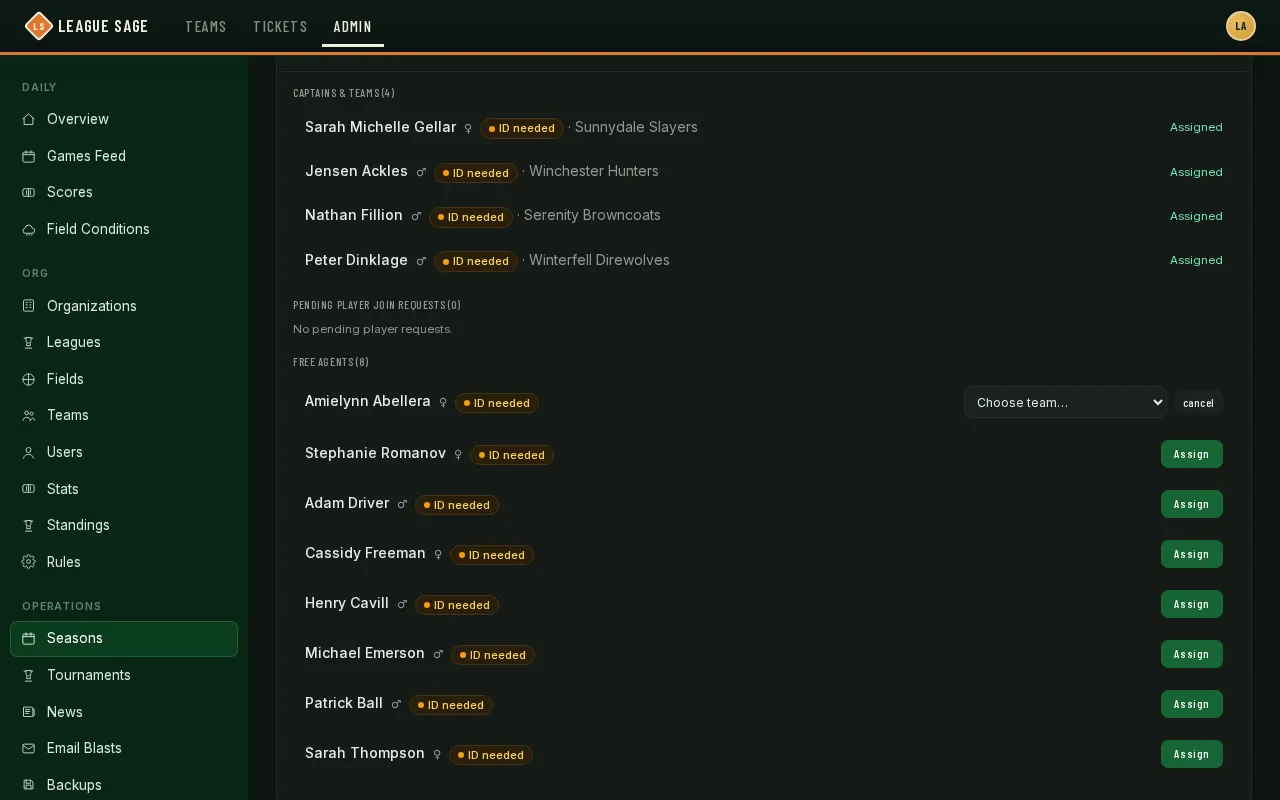
- Open the season’s Registration tab and find the Free Agents list — everyone who registered without picking a team, alongside the assigned teams and pending join requests covered in Manage registrations & assign players.
- Check for buddy pairs first. Two free agents pair up automatically when they both name each other at registration (matching email or exact display name) — there’s no separate “request to pair” step for players. Once paired, an offer to either of them is really an offer to both, and both have to accept before either joins a team. If two people meant to pair up but the automatic match didn’t catch it (a typo in the name, for instance), a registrant who named a friend but isn’t matched shows a Link button next to the friend’s name, once that friend is also a pending, unpaired free agent in the same season. Unlink breaks an existing pair — doing so cancels any pending offer on that pair, since “both accept” no longer means anything once they’re not linked. Alternatively, two friends can pair by sharing a buddy link — the first registrant generates the link from their status page and shares it with the second, who registers using the link to auto-pair with their friend. Unlinking a buddy-link pair works the same way as unlinking a name-matched pair.
- Decide how free agents reach a roster — offer and accept, assign directly, or let them come to you:
- Offer flow (the normal path): turn on drafting by opening the season’s Registration tab, finding the Free Agent Draft card, and setting Allow Draft (roster size) — any team with fewer active players than that number can then send a free agent an offer. The free agent has to accept before anything changes — a captain can’t claim a free agent outright, and more than one team can have an open offer out to the same person at once. Whichever offer they accept first wins, and every other pending offer on that person is automatically withdrawn. This whole flow happens on the coach’s side; see Draft free agents for what it looks like for them. Leave Allow Draft blank to turn drafting off for the season entirely.
- Admin assign (the shortcut): whether or not drafting is on, you can place a free agent on a team yourself — click Assign next to their name in the Free Agents list and pick a team from the dropdown. This bypasses the offer/accept flow completely — the player doesn’t need to agree first — and it automatically cancels any offers already pending on that person (and breaks their pair, if they had one), so nothing is left dangling.
- Recruiting (the free-agent-initiated path): independent of drafting, a captain can turn on “Open to free agents” for their own team from Team Settings. Once that’s on, any free agent in the season can find the team, see a quick roster preview, and ask to join on their own — no offer needed. Those requests aren’t a separate list to check: they land right in Pending Player Join Requests above, and you (or the team’s lead — coach or captain) approve or decline them exactly the same way as a request made at registration — including buddy pairs: approving a paired free agent’s request resolves the pair the same way an offer accept or a direct assign does, so you don’t need to check in on their partner separately. Declining one of these requests is gentler than declining an ordinary one, too — since the free agent only asked this one team, not to leave the season, they land back in the free-agent pool automatically and can ask a different team right away.
Reserving free agents from the draft
Section titled “Reserving free agents from the draft”Set Reserve free agents (next to Allow Draft) to keep the last N free agents out of the captain draft. Captains can draft while more than N remain; the final N can only be placed by an admin — handy for balancing rosters at the end of registration. Leave it empty for no reserve.
Reading the free-agent questionnaire
Section titled “Reading the free-agent questionnaire”If you turned on the Free-agent questionnaire (on this same tab’s Registration requirements card — see Registration settings), every free agent and buddy registrant answers four quick questions before they can finish registering: why they’re joining, whether they’re likely to hang out with the team, what matters most to them, and their current skill level.
Their answers show up right in the Free Agents list — two small tags next to their name showing what they said matters most and their skill level, plus an Answers ▸ toggle that expands all four questions and their chosen answers. A row with no tags means either the questionnaire wasn’t on yet when they registered, or it’s a team registration (only free agents and buddies are asked). Answers stay attached to the registration even if it’s later withdrawn or declined.
The skill answer does double duty — it also updates that player’s reported skill level for the sport, the same signal used elsewhere in the app (like AI division suggestions), so a first-time free agent’s self-assessment isn’t wasted.
Right now this is an admin-only view — captains don’t see questionnaire answers, and the questions themselves are fixed (not something you can customize per organization).
Good to know
Section titled “Good to know”- Free-agent drafting and direct assignment aren’t mutually exclusive — a season can have drafting on for captains while you still step in with a direct assignment when it’s faster.
- This demo season doesn’t have drafting turned on, and none of its free agents are paired, so the Link/Unlink controls aren’t visible here — they only appear once a pair actually exists.
- A season that charges a fee can also require it to be paid before a free agent’s acceptance goes through; an unpaid acceptance politely stays pending instead of silently failing.