Track attendance & RSVPs
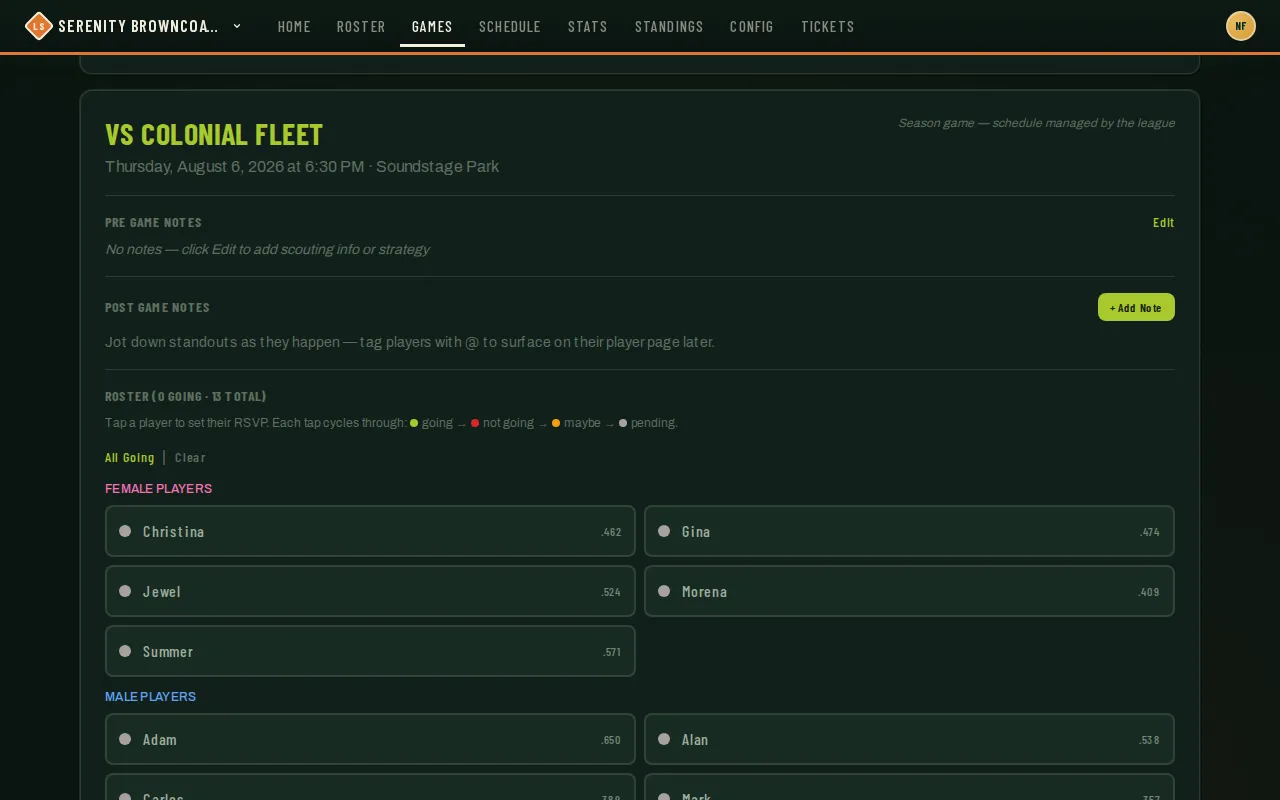
Players RSVP themselves most of the time, but you can set or override anyone’s status directly from the game page — useful for a text-message “I’m in” that never made it into the app, or for locking in attendance the night before.
Who can do this
Section titled “Who can do this”Coaches and captains can set attendance for anyone on the roster. Every player can set their own. A parent, partner, or anyone else a player has explicitly granted RSVP delegate access to can also answer on that player’s behalf — see Good to know below.
- Open the game and find the Roster section — it shows a running count (“N going · M total”) and an Edit link.
- Click Edit to see every player as a tappable chip, grouped by gender, each showing their OBP for context.
- Tap a player’s chip to cycle their status: going → not going → maybe → pending. Changes save as you tap — there’s no separate save step.
- All Going / Clear above the list are shortcuts for setting or resetting everyone at once.
- Above the roster, a Schedule Notices section (when it appears) flags any attending player who’s also playing another game that overlaps or falls close by — with the other team, time, and a conflict tag if it’s severe enough that they genuinely can’t make both. A player marked not going drops off the list, so it only shows people you’re still counting on.
- If you’re short of players, tap the dashed + Find subs chip at the end of the roster — see Find subs.
Good to know
Section titled “Good to know”- Attendance updates broadcast live — if two coaches or a captain and a coach are both looking at the game, everyone sees changes as they happen, no refresh needed.
- Once a game starts, players’ own RSVP buttons lock to a read-only chip; the coach-side Edit toggle keeps working so you can still record a last-minute status change or a no-show.
- A player can authorize someone else — most commonly a partner who manages the family schedule — to RSVP for them without logging in as them. That’s managed from the player’s own Profile page, not from here.
- For a player who will never sign in, an admin can set that delegate up for them: Admin → Users, the RSVP delegates button on the player’s row. The delegate then sees that player’s RSVP alongside their own on each game.
- Attendance is a separate concept from the lineup: setting someone “going” doesn’t put them in the batting order by itself — you still generate or edit the lineup from their attendance. See Build & activate lineups.