RSVP to games
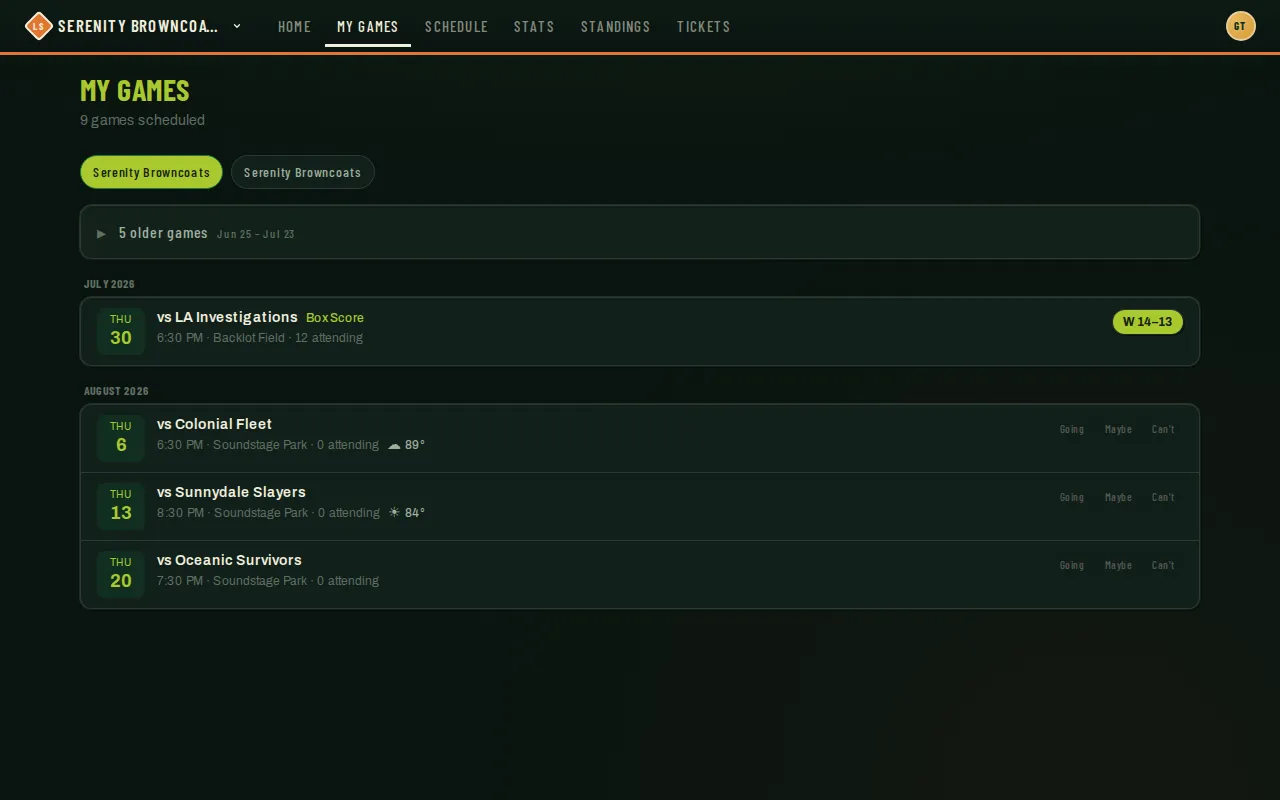
Your coach needs a headcount before every game — for lineups, for fielding, and to know when to go looking for a sub. RSVPing takes one tap, updates the moment you tap it, and you can change your answer right up until game time.
Who can do this
Section titled “Who can do this”Coaches, captains, and players. Observers don’t RSVP. If you’re a sub, you don’t get a running list to answer — you’ll already show up as available for the specific game a coach added you to.
- Open My Games from the top of the page, or just use the next-game card on your dashboard.
- Next to any upcoming game, tap Going, Maybe, or Can’t. It saves immediately — no confirmation screen.
- Changed your mind? Tap a different button any time before the game starts.
- If your league emails RSVP reminders, you’ll get one a few days out (and possibly a closer nudge too) listing every game your team plays that day, each with its own Going / Maybe / Can’t button right in the email. Clicking one records your answer without needing to sign in — if the day has more than one game (like a doubleheader), the email page lets you set each one individually.
- RSVP push notifications (on Android, desktop, and iPhone) come with ✓ Going and ✗ Can’t buttons right on the notification — tap one and your answer is saved without opening the app. Want to say Maybe? Tap the notification body to open the game. Not ready to decide? Just ignore it — the reminder comes back the next day.
Good to know
Section titled “Good to know”- A reminder email only asks about games you haven’t already answered — anything you’ve already RSVP’d to is left alone, though you can still change it from the email’s landing page.
- If you have push notifications turned on, you’ll get the RSVP push reminders shown above instead of the email — reminder emails only go to players who aren’t getting notifications on any device.
- Whether reminder emails or push notifications go out at all, and how far ahead, is a per-team setting your coach controls — not every team turns them on.
- Practices and socials get the same push reminders as games (morning-of, RSVP nags, and weather heads-ups), named by the event’s title when your coach gave it one (“Bar night”). A scrimmage — a scored exhibition game against an outside opponent — gets reminder emails too, just like a real game; practices and socials stay push-only.
- Your RSVP feeds the “N attending” count coaches see and shapes the lineup, so answering promptly (even a Maybe) genuinely helps.
- Once a game starts, RSVP buttons lock — you’ll see your answer as a read-only chip instead.