Registration reminders
People sign up and then stall: the waiver is unsigned, the fee is unpaid, the shirt size is blank. League Sage follows up for you. Anyone registered for a season who has not finished gets up to five reminders. Each one lists exactly what that person still owes and links to their registration page.
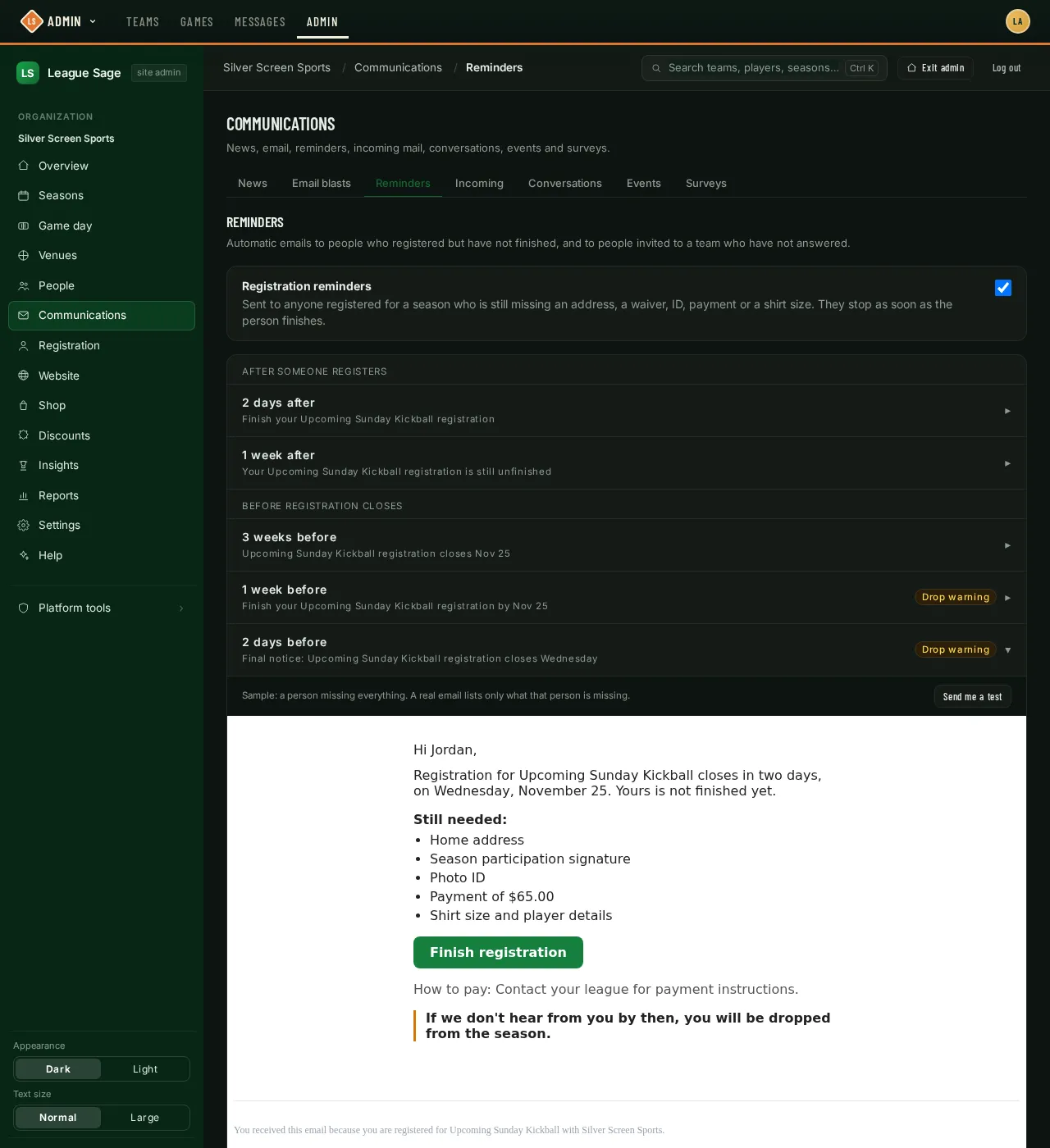
Who can do this
Section titled “Who can do this”Organization admins and site admins. Open Organization → Communications → Reminders.
When reminders go out
Section titled “When reminders go out”| When | What it says |
|---|---|
| 2 days after they register | Your registration is not finished yet |
| 1 week after they register | A few things are still open |
| 3 weeks before registration closes | Registration closes on that date |
| 1 week before registration closes | Finish by that date, or you will be dropped from the season |
| 2 days before registration closes | Final notice, with the same warning |
- Reminders go out between 9 AM and 8 PM Eastern.
- A person gets at most one reminder per season per day. In the last week before registration closes, only the before-close reminders are sent.
- Nobody is reminded on the day they register.
- A season with no registration close date sends only the first two.
- Reminders stop as soon as the person finishes.
What counts as unfinished
Section titled “What counts as unfinished”Each reminder lists only what that person is missing, and only things the season asks for:
- Home address, when your organization tracks where players live.
- Waivers, one line for each unsigned document attached to the season.
- Photo ID, when the season requires ID verification. Someone whose ID is waiting for your review is not reminded about it.
- Payment, when a balance is owed. Players billed to their team are not asked to pay.
- Shirt size and player details, when the season collects them.
Waitlisted and withdrawn registrations are never reminded.
Nobody is removed automatically
Section titled “Nobody is removed automatically”The last two reminders tell people they will be dropped if you do not hear from them. League Sage does not remove anyone. After registration closes, you decide who to withdraw. Organization → Reports → Roster completeness shows who is still missing what.
How people receive them
Section titled “How people receive them”Everyone gets the email. People who use the app also get a notification and an entry under the bell. The first three reminders respect a person’s Reminders notification setting. The two final reminders always send, because they are notice of losing a spot.
Payment reminders
Section titled “Payment reminders”Payment is part of these reminders. When a season’s payment is due on the day registration closes, registered people hear about payment here and no longer get the separate payment reminders 7 days and 1 day before. A season with its own payment due date still sends those.
Read the emails, or turn reminders off
Section titled “Read the emails, or turn reminders off”The Reminders page lists all five. Click one to read the email as a sample person who is missing everything would get it. Your organization’s logo is at the top of each email when you have set one, and at the top of every team invitation email too (the first invitation, a captain’s or coach’s reminder and the automatic reminder). The switch at the top turns the whole set off for your organization. Payment reminders then run as they did before.
Send yourself a test
Section titled “Send yourself a test”Open a reminder and press Send me a test. League Sage emails that reminder to your own address, so you can see it in your inbox. A test works whether reminders are on or off, and it is never sent to anyone else.
Change the wording
Section titled “Change the wording”You can rewrite the subject line and the opening message of each reminder, in your organization’s own voice.
- Open a reminder and press Edit wording.
- Change the Subject and the Opening message. Use Insert a blank to add details that differ for each person:
- [Season name] in the registration reminders,
- [Close date] in the three reminders before registration closes (for example “Friday, December 11”),
- [Team name] and [Organization name] in the team invitation reminder.
- Press Preview to see the email with your changes and its subject line, then Save.
If you open another reminder or close this one with changes you have not saved, you are asked whether to discard them; answer no to keep editing.
If someone else changed the same reminder while you were editing, Save says so and keeps your text in the box: press Save again to use your version, or Cancel to keep theirs.
A few rules keep every reminder correct:
- The reminders before registration closes must keep [Close date] in the opening, because the warning that follows says “by then”.
- The subject is one line of up to 150 characters; the opening is up to 600. A blank line starts a new paragraph. A counter under each box says “over the limit” and the box is marked as invalid when you go past the limit.
- It is plain text: what you type is shown as typed, with no formatting. Subjects cannot contain line breaks or hidden characters, and openings cannot contain hidden characters other than line breaks and tabs. A box with nothing visible in it counts as empty.
- Square brackets are only for blanks. Anything else in square brackets is refused, and so is a single stray bracket, so a typo like [Seasn name] never reaches a player. This also means you cannot use square brackets for anything else in a subject or an opening.
The box opens with a starting text written with blanks. For the three reminders before registration closes, it is not word for word the built-in wording. The built-in subject uses a short date (“closes Dec 11” or “closes Friday”), but [Close date] always writes the long date (“Friday, December 11”). The built-in opening for the reminder one week after registering says “one thing is” or “a few things are” depending on how much is missing, and the starting text always says “a few things are”. If you save a box without changing the starting text, the reminder keeps the built-in wording and does not show Customized. Change even one word and that box uses your text, long date included.
The list of what is still missing, the Finish registration button, the drop warning, the payment lines and the app notifications stay automatic. A reminder you changed shows Customized; press Reset to default to go back to the built-in wording. Send me a test always sends the saved wording.
For the team invitation reminder you can change its subject and the “This is a reminder.” line. Captains’ and coaches’ own reminders always use the built-in wording.
Team invitation reminders
Section titled “Team invitation reminders”League Sage also reminds people a captain or coach invited to a team who have not answered yet. They get the invitation email again every 5 days, starting 5 days after they were last emailed about it, until they accept or decline, the team fills or locks in its roster, or the season’s registration closes. With no registration close date, or for an invitation with no season (a sub, for example), a person gets three reminders at most. Each reminder has a Not interested link, so someone who does not want to join can say no without an account; the team’s coaches and captains are told.
The reminder’s subject names the team and your organization, for example “Reminder: Join Bocceholics for Example League”.
A captain’s or coach’s own Send reminder or Resend still works. It sends the same subject, counts toward the once-a-day limit and restarts the 5 days.
On the Reminders page, the Team invitations group has its own switch, one row, “Every 5 days until they answer”, that opens the email, and Send me a test. Turning it off stops the automatic invitation reminders for your organization; captains’ own reminders keep working.