Admin on your phone
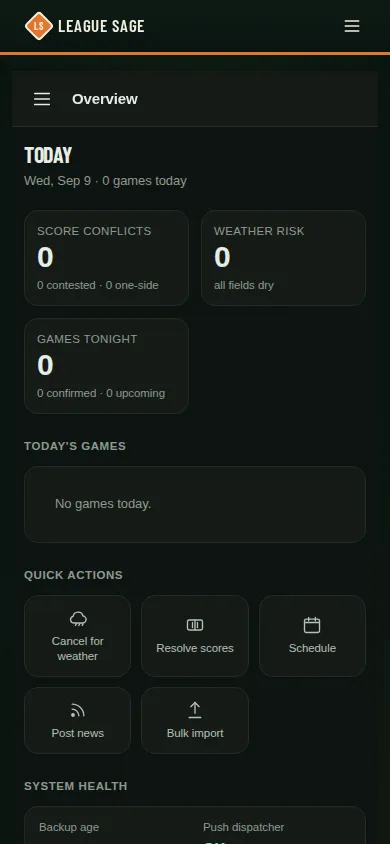
Open the admin area on a phone and you get a purpose-built mobile shell, not a squeezed-down copy of the desktop layout. It’s dark by design (the mobile shell doesn’t follow your light/dark preference) and covers real work — score reconciliation, registrations, fee collection — not just browsing.
Who can do this
Section titled “Who can do this”Anyone with admin access — the mobile shell activates automatically below 768px width for whatever scope your account already has (site admin, organization admin, or league admin). There’s no separate mobile login or permission.
- Open the app on a phone (or shrink your browser below tablet width) while signed in as an admin — the layout switches on its own; there’s nothing to toggle.
- The hamburger menu (or the More button on the bottom bar) opens a slide-in drawer with the same nine organization sections as the desktop sidebar — Overview, Seasons, Game day, People, Communications, Registration, Discounts, Insights, Settings. Four of those sections (Home, Seasons, Game day, People) also sit on a bottom tab bar for one-tap access. Site admins also have Platform tools and separate Organizations, Users, Operations, AI, and Utilities dashboards in the drawer. Within Platform tools, the bottom bar switches to Home, Organizations, Users, Operations, and More; More includes AI and Utilities. Open organization returns to the organization’s workspace.
- Overview leads with a row of range chips (7, 14, 30, 90 days, or the season) and three stat tiles; the scores grid scrolls sideways to show every day or week in the range. Tap an umpire-gap row to assign one, or tap a tonight’s-game row to open the same score-edit sheet used on the Scores screen.
- Season detail is fully mutation-capable on mobile, not read-only: assign, pair, and mark-paid on registrations; record or refund a fee; move a season through its status stages; review a pending ID scan; and edit a game’s date, time, field, or matchup on any season that isn’t archived — all from tabs on the same screen.
- Open Settings for General, Leagues & divisions, Fields & venues, and Rule sets. Each of these pages shows the same Settings header and tabs, so you can switch between them from any of them. Site admins can edit the organization’s name and Discord guild; organization admins can read those details. League admins see only Leagues & divisions.
- In Leagues & divisions, organization and site admins open Edit to configure the league, including AI persona prompts and batting/fielding generation rules. Each lineup-rules box saves with its own button and says Not saved yet until you do; Save league asks before it closes the editor over rules you haven’t saved. League admins get Lineup rules instead, which opens just their league’s lineup rules. You can edit shared rule sets from Rule sets, including names, gender rules, personas, and compiled rules. Admins, Import, and Reset league appear for the roles allowed to use them. Reset still asks for confirmation. Only a site admin can move a league out of its organization.
- Site admins can open Platform tools → Organizations → Organizations to create an organization or open an existing one. Failed creates and saves keep your draft visible so you can retry.
- Some workflows still need desktop, including drag-and-drop lineup or schedule swaps, batch prompt rebuilds and season snapshots, and tournament bracket mutations. The mobile tournament view offers an Open desktop editor link for those changes.
Good to know
Section titled “Good to know”- The mobile shell is dark-only on purpose — it doesn’t read or follow your device’s light/dark setting.
- Every mutation on mobile posts to the exact same API endpoints as its desktop counterpart, so nothing behaves differently depending on which one you used — it’s the same audit trail either way.
- Wide tables (like the Scores or Standings history) scroll horizontally inside their own card on mobile rather than shrinking illegibly or breaking the layout.
- If a screen you need isn’t mutation-capable yet on mobile, it always gives you a direct link back to the desktop version rather than just leaving you stuck.