Keep score on game day
Game Mode is the at-the-field scoring surface — built for one-handed use on a phone in bright sun, not a desk. It’s not a separate page; it’s a toggle on the game itself, so you never lose your place.
Who can do this
Section titled “Who can do this”Coaches, captains, and site admins can enter Game Mode and record at-bats. It only unlocks once a lineup exists — generate one first if you haven’t (see Build & activate lineups). Players watch the score update live but can’t enter Game Mode themselves.
- Open the game and tap Game Mode in the action row. The page strips down to a sticky scoreboard at top, a scoring surface in the middle, and a control dock at the bottom.
- While your team bats, the default view is one batter at a time: tap 1B / 2B / 3B / HR / BB / OUT for the result — that tap is the save, there’s no separate submit. A small diamond shows runners on base; tap an occupied base to mark it Scored or Runner out, or drag a runner to a different base to correct it.
- If you track hit location and quality, the screen scrolls down to a field diagram after a hit — tap where it landed and how hard (grounder / line drive / fly ball), in either order.
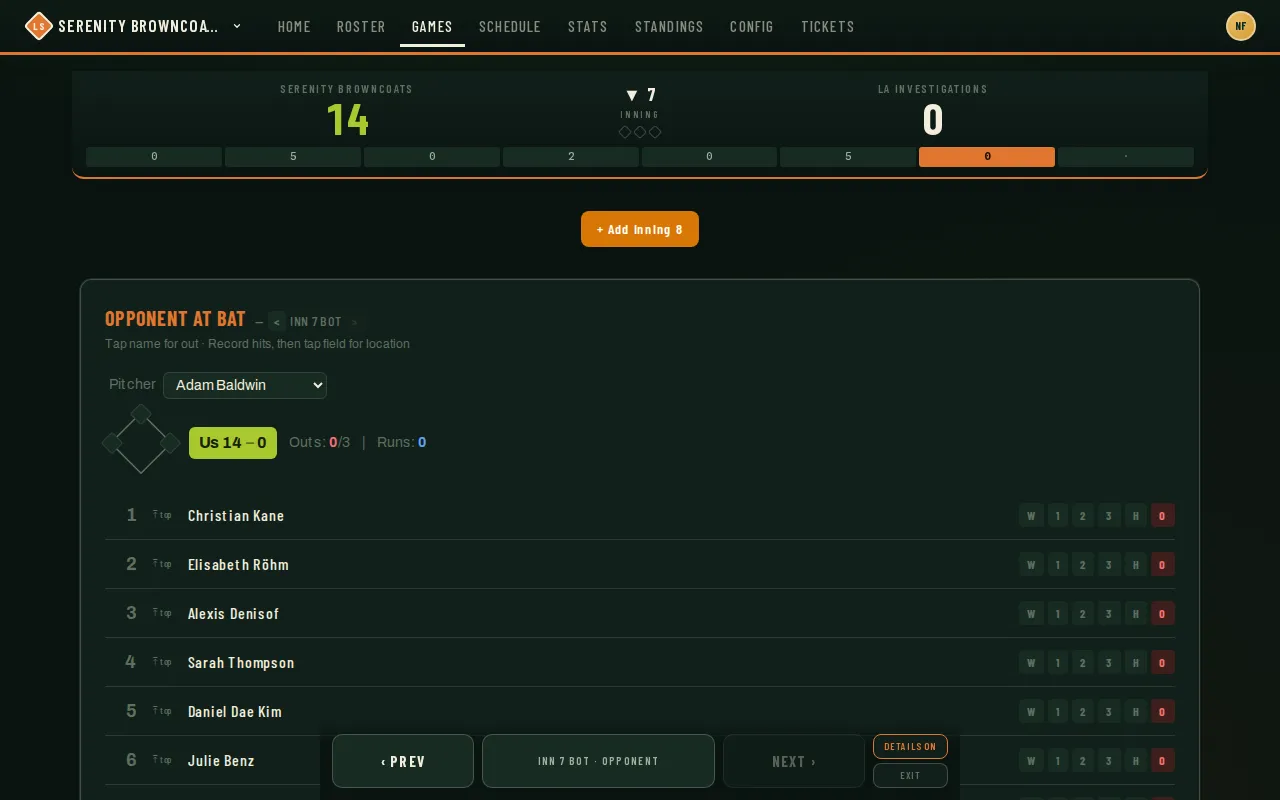
- While the opponent bats, the surface switches to a batter list — screenshot above. Tap a name to record an out, or record a hit and tap the field for location. A pitcher selector at the top tracks who’s on the mound for you, defaulting to whoever’s in your fielding lineup that inning.
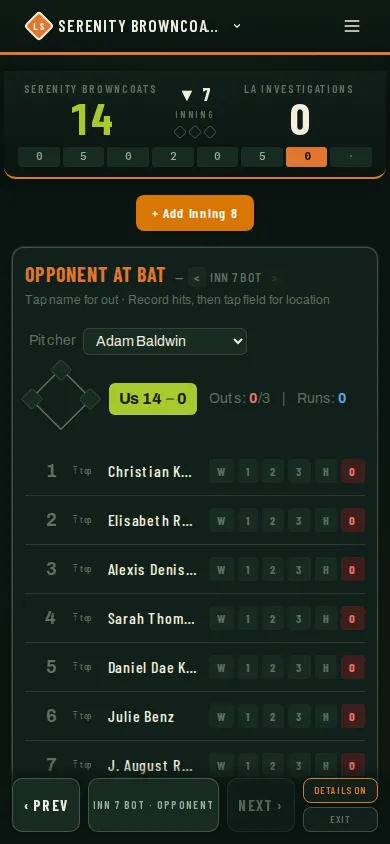
- The bottom dock moves between half-innings (‹ Prev / Next ›) and has a toggle for Details On/Off — turn details off mid-game if hit-location tracking is slowing you down. The same dock and scoreboard shrink to fit a phone screen without losing anything:
 6. Made a mistake on the very last at-bat? There’s a one-tap undo right on the batting screen. Anything older than that, use Book view — the full scorebook-style grid reachable from the same dock — to fix it.
7. When the game reaches its last scheduled inning and the score is tied, an + Add Inning button appears so you can keep scoring into extras.
8. Tap Exit in the dock to leave Game Mode and return to the regular game page — this is deliberate: there is no way to finalize the score from inside Game Mode itself, so a stray tap can’t end a game by accident.
6. Made a mistake on the very last at-bat? There’s a one-tap undo right on the batting screen. Anything older than that, use Book view — the full scorebook-style grid reachable from the same dock — to fix it.
7. When the game reaches its last scheduled inning and the score is tied, an + Add Inning button appears so you can keep scoring into extras.
8. Tap Exit in the dock to leave Game Mode and return to the regular game page — this is deliberate: there is no way to finalize the score from inside Game Mode itself, so a stray tap can’t end a game by accident.
Good to know
Section titled “Good to know”- Ending the game is a separate step. After Exit, the game page shows an End Game button — that’s where you submit the final score, not Game Mode.
- Lost signal at the field? Recorded at-bats queue on the device and replay automatically once you’re back online — nothing is lost, and replays are safe even if the connection drops mid-write.
- If your scoring permission changes for one game, its queued writes wait while other games keep syncing. Once your permission is restored, use Retry now to send the waiting writes in their original order. If your session has expired, sign back in to resume syncing.
- If a second coach or a captain opens the same game on another phone, they see your scoring update live — handy for a scorekeeper in the dugout and a coach watching from the field.
- Once at-bat data exists, the batting order locks for that game — no more drag-and-drop reordering or regenerating.
- Noticed a wrong play days later? Open the game and tap Edit on the Recorded plays card to correct any at-bat — result, run scored, or who drove it in. Changes update stats straight away. See step 8 of the scorebook guide.
- Players can propose fixes too. A player who spots an error in their own plays can send a correction from the game page — you’ll get a notification, and the proposals wait in a Stat fixes to review list on that game plus a Stat fixes card on your dashboard. Accept or decline each one there, or hit Approve all on the dashboard card to apply everything at once. Nothing changes until you approve.
- Forget to submit a final score? The day-after reminder arrives as a notification on your phone or browser — you’ll only get an email too if you don’t have notifications turned on anywhere.
Related
Section titled “Related”- Build & activate lineups
- Track attendance & RSVPs
- Print lineups & share stats
- Upload a paper scorebook — photograph the book instead, and the editor for fixing a play afterwards