Custom lineup rules in plain English
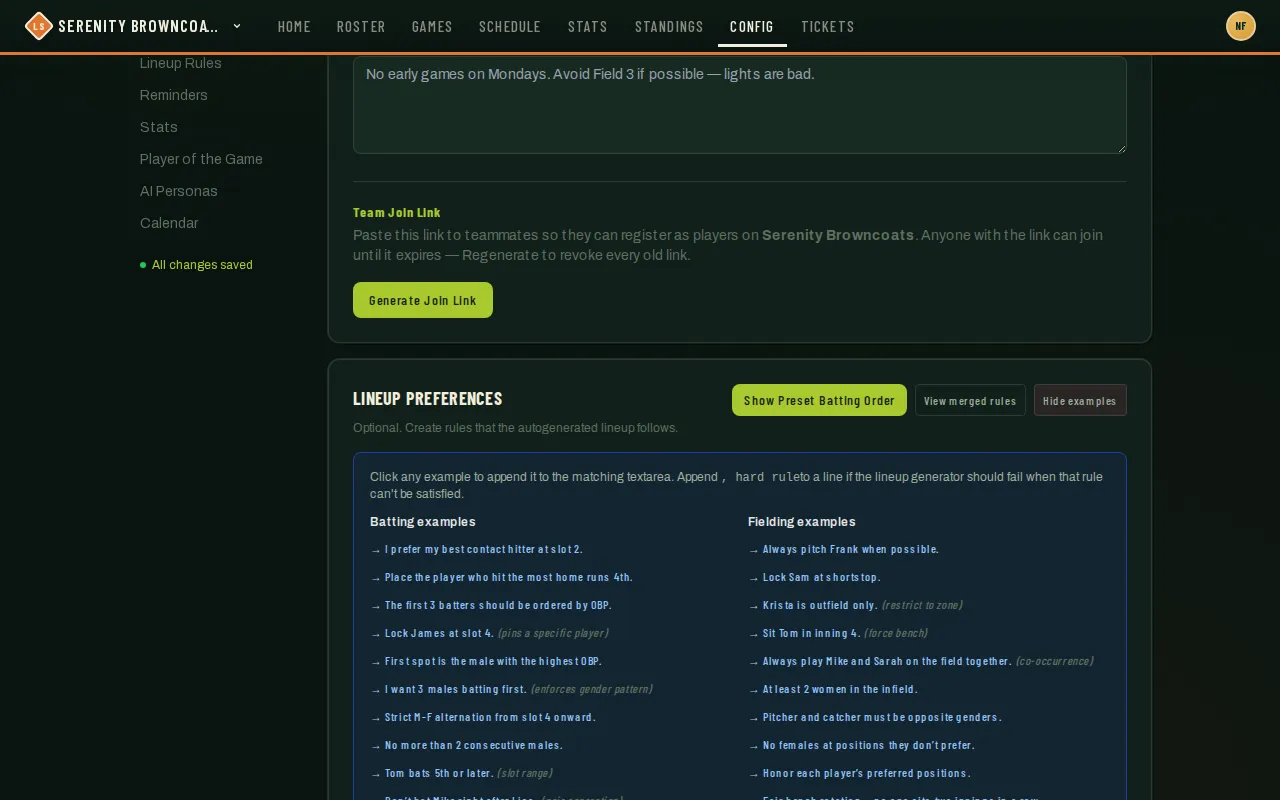
You don’t write anything technical here — you write sentences, the way you’d say them to an assistant coach: “Lock James at slot 4,” “Krista is outfield only,” “everyone plays at least 2 innings.” League Sage compiles each line into a rule the lineup generator enforces every time you hit Generate.
Who can do this
Section titled “Who can do this”Coaches and captains, from Config → Lineup Rules (the Lineup Preferences card). League admins can set rules at the league level too (required for every team, or soft defaults) — anything you write here as a coach layers on top of those and always wins if the two disagree at the same point.
Writing rules by example
Section titled “Writing rules by example”There’s a Show examples button that inserts these directly — click one and it’s appended to your prompt. A few, with what each one actually does:
- “The first 3 batters should be ordered by OBP.” — orders the top of your lineup by on-base percentage instead of leaving it to chance.
- “Lock James at slot 4.” — pins a specific player to a specific spot in the batting order, every game, until you change or remove the rule.
- “No more than 2 consecutive males.” — a gender-balance rule for co-ed leagues: caps how many of the same gender can bat back-to-back.
- “Krista is outfield only.” — restricts a named player to outfield positions; she’ll never get generated at an infield spot.
- “Sit Tom in inning 4.” — benches a specific player for a specific inning (a working parent who’s always 20 minutes late, a knee that needs a rest inning — whatever the reason).
- “Everyone plays at least 2 innings, with 1 in the infield.” — a fairness rule ensuring nobody sits the whole game.
- “Pitcher and catcher must be opposite genders.” — ties two positions together with a gender relationship, rather than naming players.
Write in your own words — you don’t need to match these exactly. Name a real player when you mean a specific person; the compiler resolves names against your actual roster.
- Open Config → Lineup Rules and find the Lineup Preferences card. There are two boxes — one for batting rules, one for fielding rules — because they’re compiled separately.
- Type your rules as a bulleted list, one idea per line, in either box.
- Click Save. It compiles and saves in one step; the rules it understood show up below the box so you can check it read you correctly.
- Made a rule that absolutely cannot be skipped? Add “hard rule” (or “must,” “strict,” “no exceptions”) to that line. If the roster on a given night makes it impossible to satisfy, Generate Lineup will fail outright with a clear reason instead of quietly ignoring it.
- Not sure where to start? Click Suggest Rules — it looks at your roster’s notes and stats and proposes a handful of lines for you to review, edit, or delete before saving.
- Click View merged rules to see everything actually in effect for your team right now, including rules your league admin set that you never touched.
Good to know
Section titled “Good to know”-
Player notes count too. Generate Lineup considers position preferences, avoiding leadoff, explicit running speed, and late arrival from your roster’s notes. “May be late to 6pm games” requests a later batting slot and the first-inning bench for a 6pm game. It needs a spare bench seat and yields to your saved lineup rules. Use an RSVP note for a one-time change; regenerate the lineup after updating a note.
-
To use only your private coaching notes, check Ignore player-submitted notes under Config → Lineup Rules. It saves automatically for this team. Shared player notes and RSVP notes are then ignored by Generate Lineup, new AI Coach reviews, and Suggest Rules. Existing lineups and saved rules stay as they are; notes remain readable and editable.
-
Be explicit about gender patterns: “alternate men and women” and “no more than two consecutive men” mean different things. Ambiguous phrasing is flagged for clarification. Unsupported parts of a sentence appear in the warnings even when another part can be saved.
-
A rule your league admin marked required always applies and always wins over anything you write — this shows up as a warning if you try to write something that conflicts with it.
-
A rule your league admin marked as a soft default applies too, but only until you write your own rule covering the same thing — your team’s version takes over at that point.
-
The game page also has its own “Tonight’s Lineup Preferences” box — a one-off layer just for that game (a guest player, an unusual absence) that disappears after, without touching your saved team rules.
-
If your rule doesn’t show up after saving, check the warnings — a common one is “the league already enforces this,” which means what you asked for is already covered upstream and adding it again wouldn’t change anything.