Player notes & scouting
Two related but separate things live under “notes”: player notes — what you know about someone on your own roster — and scouting — what you’ve recorded about how opposing batters hit against your team, game after game.
Who can do this
Section titled “Who can do this”Coaches and captains see and edit both note boxes for their own players. Players only see and edit the player-visible box on their own notes page. Recording opposing at-bats and reading scouting history is open to whoever’s scoring the game.
Player notes
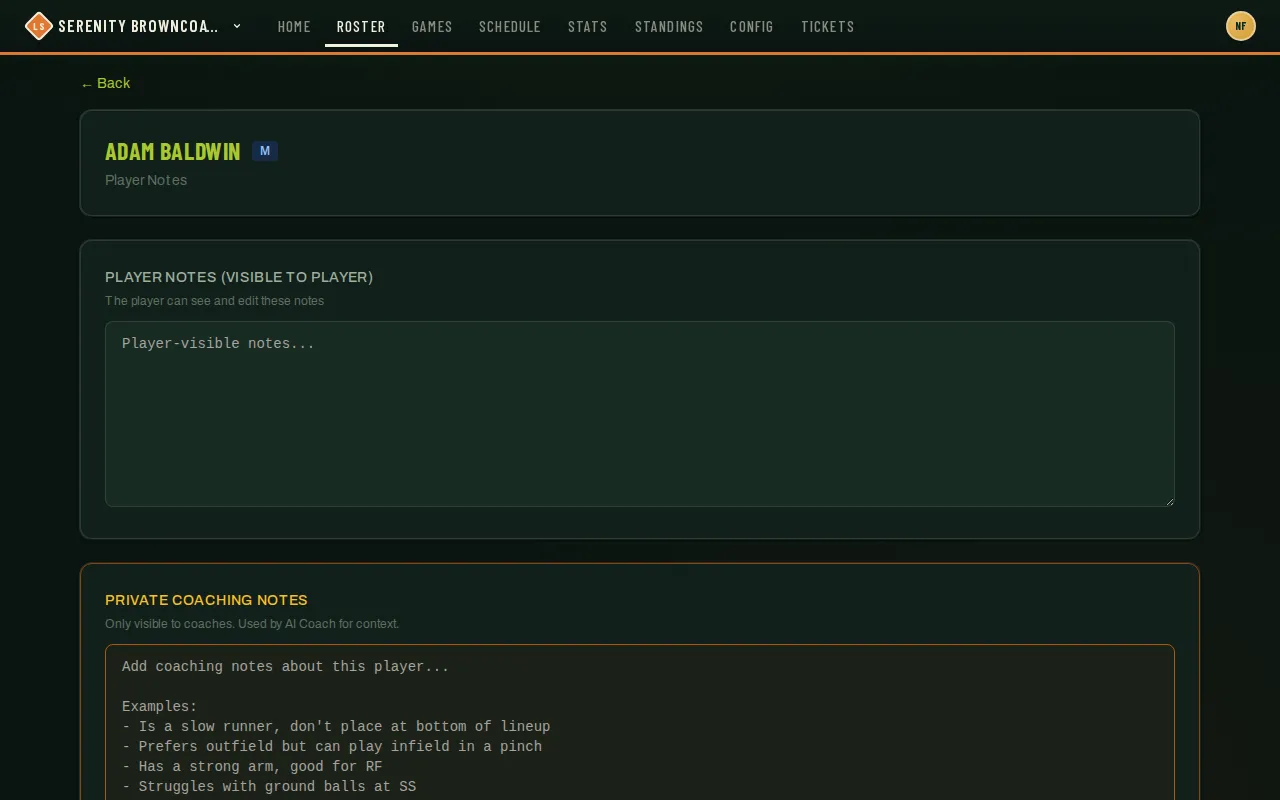
Section titled “Player notes”- From Roster, click Notes on any player’s row.
- Player Notes (visible to player) is a shared box — the player can read and edit it too. Good for things like preferred positions or availability quirks you want them to confirm.
- Private Coaching Notes is coach/captain-only — things like “slow runner, don’t bat last” or “strong arm, good for RF.” These also feed the AI Coach panel on the game page, so treat them as context an assistant will actually read, not just a diary entry.
- Click Save Notes — it’s disabled until something’s actually changed.
How notes affect Generate Lineup
Section titled “How notes affect Generate Lineup”The generator considers explicit preferences such as “prefer infield,” “do not want to play first base,” “avoid leading off,” and “fast runner.” Speed notes help avoid putting a slow runner directly ahead of a fast one.
“Running late” requests the first-inning bench and a later batting slot. “May be late to 6pm games” applies only to that start time; specify AM/PM to be precise. With ten or fewer players there is no spare bench seat, so the generator can only adjust batting. League rules, coach rules, manual locks, and fair bench rotation take priority.
Use the game’s RSVP note for tonight’s circumstances: “On time tonight” can override an older lateness note. Update recurring notes when circumstances change, then regenerate the lineup. Private coaching text stays private and is not included in the published lineup. The generator uses explicit playing requests; it does not guess restrictions from medical descriptions or historical comments.
If you want only private coaching notes to influence lineups, enable Ignore player-submitted notes in Config → Lineup Rules. This team setting defaults to off. When on, shared notes and RSVP notes are excluded from Generate Lineup, new AI Coach reviews, and Suggest Rules, including RSVP corrections to older coach notes. Both note boxes remain available to read and edit. Regenerate to apply the setting; existing lineups and saved rules are unchanged.
Scouting opposing batters
Section titled “Scouting opposing batters”- During Game Mode, while the opponent bats, every result you record (hit, out, location) builds a history against that specific batter — matched by their account if they’re on League Sage, or by a name you type in if they’re not.
- The next time you face the same batter — even months later, even a different opposing team if the person moved — a Scout panel on their row shows their prior at-bats against you: what they’ve hit, where, and how often.
- See the same history collected across every game at once from the scouting report — reachable from a game page’s header once there’s data to show, or from your own history directly.
Good to know
Section titled “Good to know”-
Post-game tools (post-game notes, fielding-play highlights, the scorebook upload) stay hidden until halfway through the game — a 60-minute 6:00 PM game shows them from 6:30. Until then the game page shows a small “unlocks at…” note in their place.
-
Post-game notes can be added, edited, or deleted by your team’s coaches and captains and authorized site admins. These changes are unavailable once the season is archived.
-
Scouting data belongs to the coach who recorded it, not to the team — it follows you if you move teams, and a teammate coach doesn’t automatically see it unless you share it with them from your Profile page.
-
Renaming an opponent’s generic “Bat 7” placeholder to a real name (when they don’t have a saved lineup) relabels every at-bat you’ve already recorded for that slot, and gives you type-ahead on that name in future games against the same team.
-
Import Notes — pulling a player’s private coaching notes forward from a team you coached them on before — is available to users with the coach role specifically; a captain won’t see that button. Nothing is copied automatically either way; you review and approve each note before it’s applied.
-
None of this is visible to the opposing team, and off-platform opponents (no League Sage account) still build a scouting history under the name you’ve recorded for them — it’s your own observations, not something you’re pulling from their side.