Team settings & join links
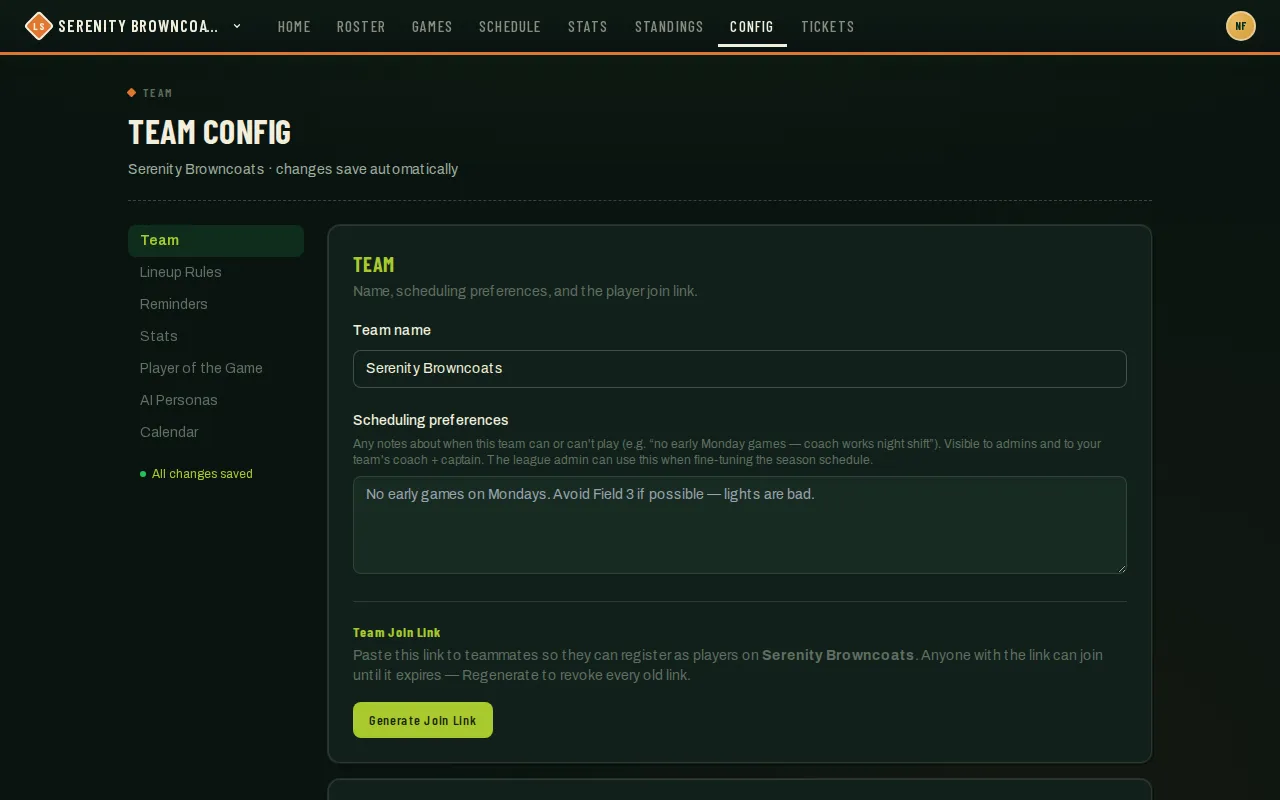
Team Config (/config) is your team’s settings hub — name, scheduling notes, and the self-serve join link live in the Team card at the top. Further down the page are cards for lineup rules, reminder emails, recruiting, AI personas, and your calendar feed; this article covers the Team card and the Free Agent Recruiting card.
Who can do this
Section titled “Who can do this”Coaches and captains. Everything on this card autosaves — there’s no separate Save button, and a status indicator in the side rail confirms “All changes saved.”
- Open Config from the top nav — it opens straight to the Team card.
- Team name — edit the input directly; it saves automatically and updates the navbar once it does.
- Scheduling preferences — a free-text note (e.g. “no early Monday games — coach works night shift”). Your league admin can see it and uses it when building or adjusting the season schedule, so it’s worth keeping current even though nothing forces you to.
- Team Join Link — click Generate Join Link to mint a shareable URL. Paste it into your team group chat; anyone who opens it lands on a “Join {team}” page and is added as a player in one tap, no invite email or admin needed.
- Once a link exists, the same spot shows the URL with Copy, Regenerate, and Disable. Regenerate immediately invalidates every copy of the old link (useful if it got shared somewhere you didn’t intend) and mints a fresh one; Disable turns it off entirely until you generate again.
- Open to free agents — a separate card further down the page (jump straight there from the Recruiting entry in the side rail). It’s a single checkbox, off by default. Turn it on and free agents registered for your season can find your team, see a short roster preview, and ask to join — you still approve every request; it just gives you a second way for a request to show up, alongside anyone who asked to join at registration.
Good to know
Section titled “Good to know”- The link is a shared secret, not a per-person invite — whoever has it can join, so treat it like you would a group-chat invite. Regenerate if it leaks somewhere public.
- A generated link is good for 90 days from when you last generated or regenerated it; the card shows the expiry and switches to a warning once it’s passed.
- The join page also offers “are you one of these players?” for teammates you already added to the roster by name but who don’t have a login yet — opening the link lets them claim that existing roster spot instead of creating a duplicate. Players you added with an email on file (for example imported from LeagueApps) claim their spot right on the join page too — they confirm the email we have for them and enter the 6-digit code it receives, then set a password. Placeholders without an email just pick their name and set up their login directly.
- This is one of four ways someone ends up on your roster, alongside admin invites, the free-agent draft, and Google/Discord account linking — the join link is just the fastest for a group of friends signing up together.
- “Open to free agents” only does anything while your season’s registration window is open — flip it on any time and it just waits, with a note on the card that free agents can’t see you yet. A request that comes in this way lands in your regular join-requests queue and is reviewed exactly like one from someone who asked to join your team at registration.