How players register
Player registration is email-first: a player enters an email address, gets a one-time link, and finishes signing up behind it. That link is also the single most common support question this section answers — “I never got an email.”
Who can do this
Section titled “Who can do this”Reference for organization and league admins. Registering is the player’s own action, walked through here so you can help when it stalls.
-
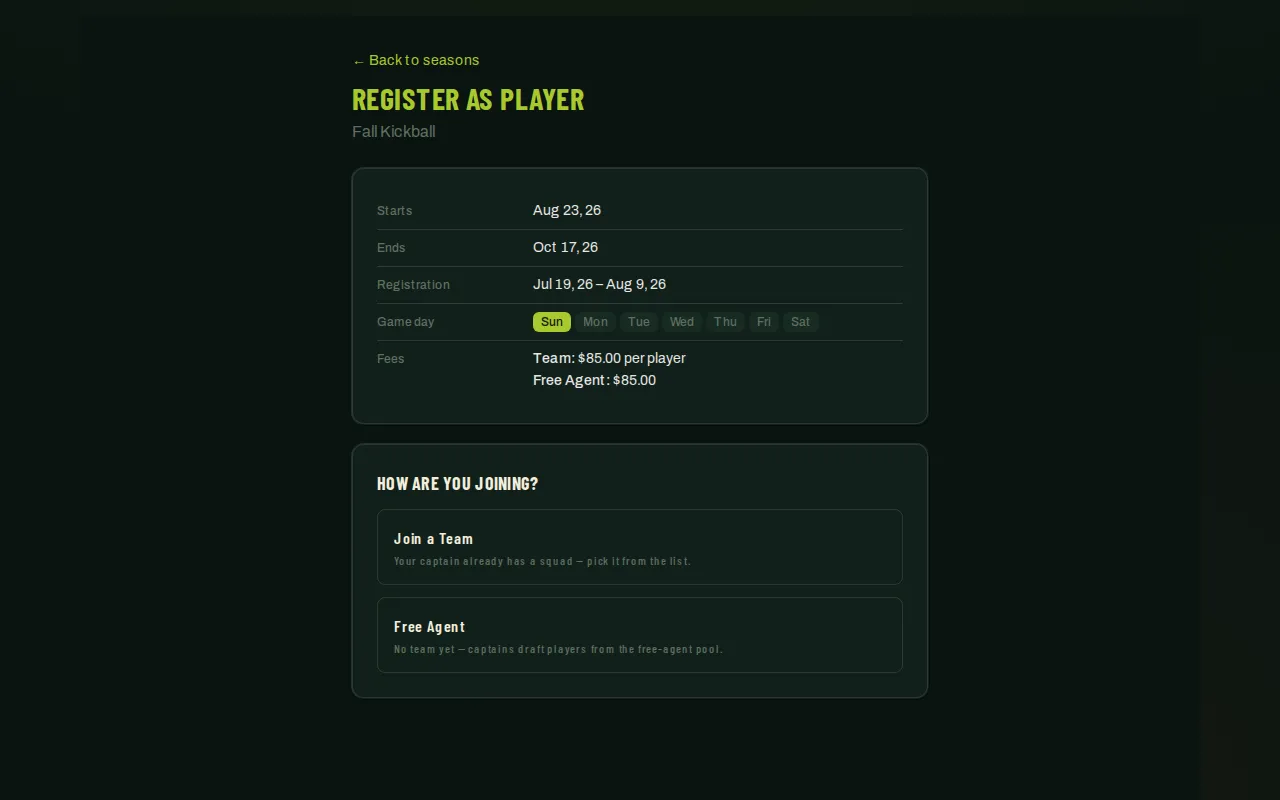
A player reaches registration one of three ways: the cross-organization registration list, your own branded registration portal, or the per-season share link the Pre-registration card copies.
-
The season page offers Find me a team, Join a team, Play with a friend, and Captain a team. The friend option is a free-agent registration with a mutual buddy request; both people still register separately.
-
If they’re signed out, they enter an email address and get a magic link — good for 7 days, single-use, and resendable after a 30-second cooldown if it doesn’t arrive right away. A player who’s already signed in skips straight past this step to the finish form.
-
The email-link landing page and finish form show the player’s registration total immediately, including any upgrades selected by their team. A notice explains the added per-player cost, and the breakdown names each upgrade and its price. The finish form collects account details for a new player, an explicit roster gender, and any required jersey answers. When the season’s Collect player details switch is on (see Registration settings), a “Your details” card also asks for mobile phone, date of birth, emergency contact, and shirt size — with phone, birthday, and emergency contact pre-filled from the player’s profile if they’ve registered before, so they can just confirm or correct them. A free agent is also asked how they heard about you and, optionally, a referral name; someone joining a team instead picks who on the roster brought them (or leaves it blank, which credits the team’s coach). Players review their season, team or buddy request, and per-person fee before confirming. Every waiver attached to the season must be signed in the signing window.
-
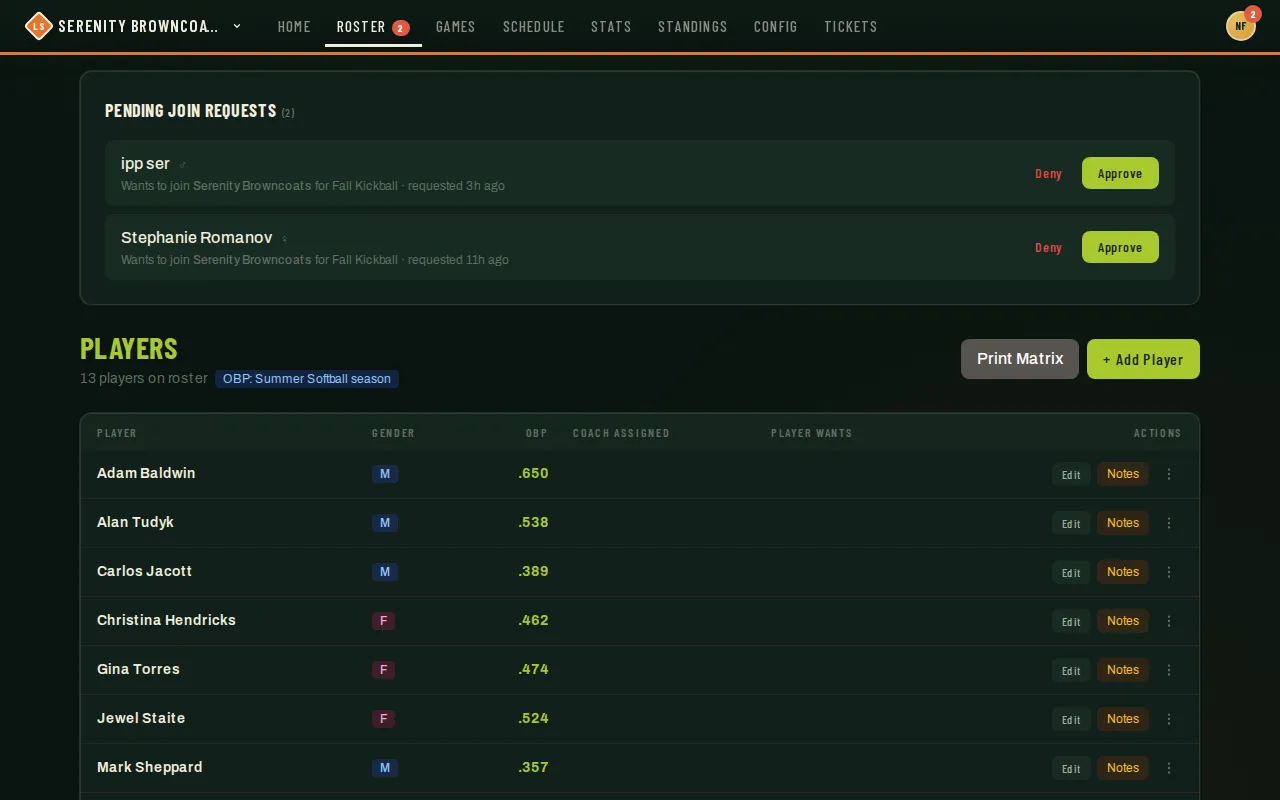
Choosing Join a Team doesn’t add them to the roster directly — it creates a pending request that the team’s lead — a coach or captain — approves or declines. Team leads see these requests in a banner at the top of their Players page and on their dashboard, and can attach a note when declining one.
-
You see the same requests under Pending Player Join Requests on the season’s Registration tab and can approve or deny them there. If online payment is enabled and required, both your Approve button and the team lead’s stay disabled until the fee is paid or fully covered by discounts or account credit. After collecting payment outside the app, use Mark fee received to allow approval. Deny stays available.
After registering, Your registration shows placement, waivers, ID verification, and the actual fee balance separately. The player can return through Your season registration on their dashboard. Players can join multiple teams in the same season, including teams in the same league. Each team has its own registration, approval, and fee balance. The season page lists existing registrations by team name. Submitting again for the same team returns the saved registration.
For teams using Consolidate bill, the email link, account form, and status page show Billed to your team. Registration fees, upgrades, and processing go on one team invoice, with no individual payment or account-credit deduction. Captains can open it from their workspace; admins manage it from the season’s team billing controls. They can pay online, create a payment link for a sponsor, or have an administrator record an offline payment once received.
A free-agent enrollment also allows separate team signups or captaining a team. Its payment and placement remain separate from the new team registration. Players can keep one free-agent enrollment per season, including after placement. When assigning a free agent, choose a team where that player does not already have a separate registration; the app prevents combining those two registrations and charges.
Good to know
Section titled “Good to know”- “I never got the link” checklist: check spam first, then use Resend email (after the 30-second cooldown); a link older than 7 days or already used won’t work — starting the form again issues a fresh one, which replaces the old link automatically.
- “It says I’m signed in as someone else”: opening a magic link while signed in to a different account (a shared family computer, usually) doesn’t silently register the wrong person — the page stops and offers a clear choice: continue under the signed-in account, or sign out first and finish under the email the link was sent to.
- An invite-only team needs a season invitation from its captain. The player verifies or creates their account, then completes the same season registration requirements. Accepting an invitation alone does not finish registration. If payment is required, captain approval follows payment.
- Approving or declining a join request isn’t locked to one role: either a coach or a captain on the team can do it, so a coach-led team is never stuck waiting on a captain. You can also approve or deny it yourself from the season’s Registration tab (see Manage registrations & assign players) if it needs a nudge. And the player isn’t locked in either — a pending Join a Team request can be withdrawn from their own dashboard at any time before it’s resolved, which is a real exit rather than a switch to free agent.
- Switching signup type or teams keeps shared contact details and shirt size. If fields are missing, the form highlights them together and moves focus to the first one.
- When a season collects player details, an active registration with none on file — typically one made before the switch was turned on — shows a required Complete your player details step on the registration-status page, marked Needed, with a Complete player details button; the checklist stays incomplete until it’s done.
- Players can choose Update player details on their registration-status page to correct contacts or the season shirt size. Their original submission remains on record. Admin Details and CSV exports distinguish current information from that original record; see Manage registrations & assign players.