Join your team
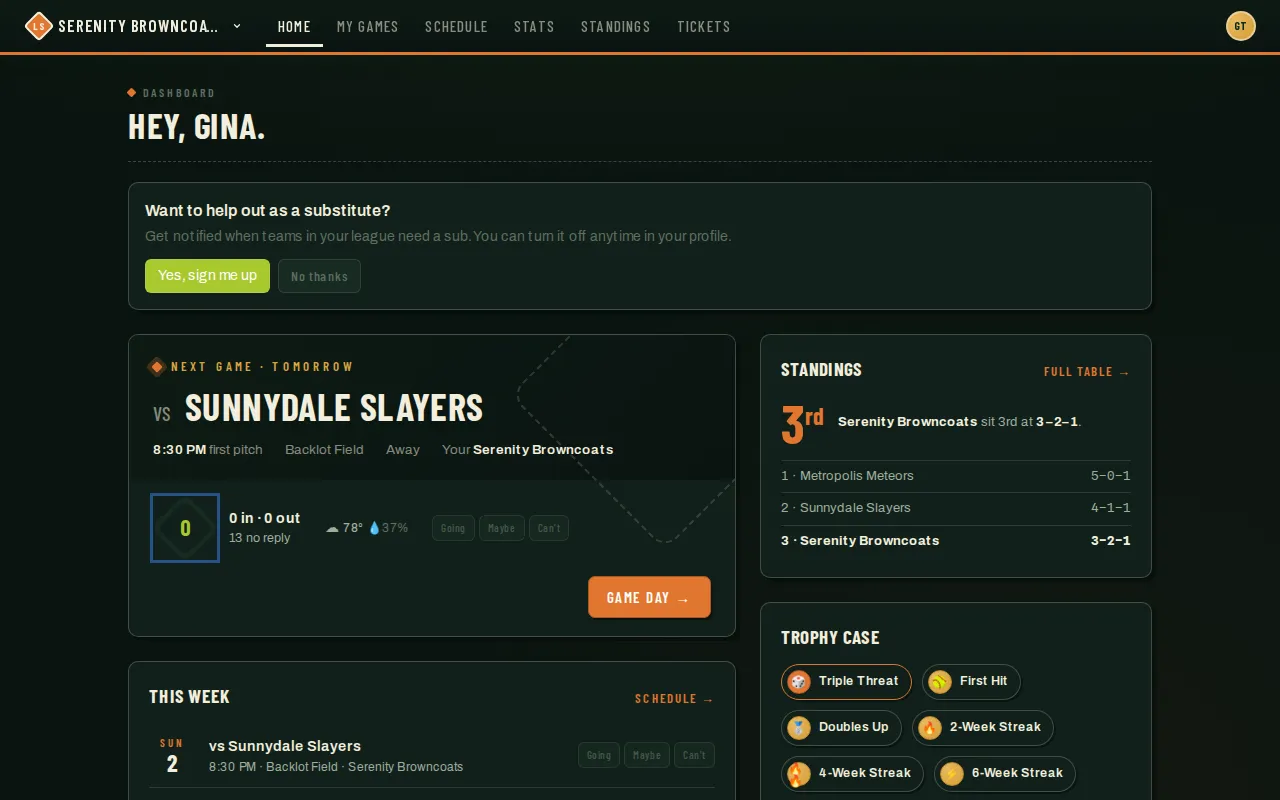
There are a few different ways you end up on a team roster in League Sage — a direct invite from your coach or captain, a shareable team link posted in a group chat, or registering as a free agent and either accepting a captain’s draft offer or asking to join a team yourself. Whichever way you got there, once you’re on a team it shows up front and center on your dashboard.
Who can do this
Section titled “Who can do this”Anyone with an account. Invites and team links don’t even require an account first — creating one is part of accepting.
- Check your email (or the link your captain shared). If your coach or captain added you to the roster, you’ll get an invite email with a link. Some teams instead share a team join link directly in a group chat — either one gets you to the same place.
- Open the link. For an email invitation, sign in with the invited account, then tap Join {Team} to approve joining. If your account has no password yet, use Verify your email to get a separate verification code, then return to accept the invitation. Signing in or opening the email link alone does not join the team.
- If you’re new to League Sage, fill in the short account form (name, username, password). Invite links and team links already know which team you’re joining, so there’s nothing else to look up. Submitting creates your account and adds you to the team in one step.
- After accepting, use Go to Dashboard if prompted. Your new team appears among your teams — you’re in.
- No invite or link? If you registered for a season as a free agent, there are a few ways you can end up on a roster. A captain can send you a draft offer — you’ll get an actionable notification (and an email) with Accept and Decline buttons, plus a pending-offer card on your dashboard. You have to accept it to actually join that team; an offer you ignore or decline never places you anywhere. (If you named a buddy when you registered and a captain offers you as a pair, you both need to accept before either of you is placed.) You can also go looking yourself: your dashboard shows a “Teams looking for players” card listing teams in your season that are short-handed, with a peek at each roster — tap one and request to join. The captain still has to approve it, so nothing changes until they do; while it’s pending, your dashboard shows you’re waiting on that captain, with a Withdraw option if you change your mind. If the captain declines instead, you’re still in the free-agent pool — nothing about your season registration changes — and you can go looking again and request a different team right away. And an admin can assign you to a team directly — that path is automatic and needs no action from you.
If your captain shared a season invite link
Section titled “If your captain shared a season invite link”Some captains share one link for the whole team in a group chat. What happens when you open it depends on whether you’re signed in:
- Signed in: you go straight to the registration form for that team and season — nothing else to look up.
- Not signed in: the page asks for your email address, then emails you the invitation link and shows a “Check your email” card. Open the link from your inbox to finish registering. The link is only ever sent to the address you typed, so nobody else can start a registration in your name by guessing your email. (Typed the wrong address? Use Use a different email and try again.)
Register with a buddy
Section titled “Register with a buddy”If you named a friend when you registered as a free agent, they can register using the buddy link from your status page — a shareable link that auto-links your pair. Your status page shows the buddy link only while you’re a pending free agent who named a friend; once you’re placed or your registration changes, the link disappears. Your friend registers through the link and their account is matched to yours as a buddy pair. Both of you stay pending free agents until a captain offers you together or an admin places you on the same team.
A few quick questions when you register as a free agent
Section titled “A few quick questions when you register as a free agent”Some seasons ask free agents (and anyone registering as their buddy) four quick questions as part of registration — why you’re joining, whether you’re likely to hang out with the team, what matters most to you, and your current skill level. Pick your answers as chips (the first two let you pick more than one); your skill question starts pre-filled from your profile if you’ve set one, but you can change it if it’s not right. All four are required before you can finish registering — your coach or league admin uses your answers to help place you with the right team.
Track your status with the registration checklist
Section titled “Track your status with the registration checklist”After registering for a season, visit /register/status (linked from your dashboard) to see your personal checklist. Each step shows what you still need to do — sign waivers, verify your ID, pay any fee, or wait for placement — and a Next: … button on the first incomplete step. No need to refresh; the page automatically updates when you come back to your browser window.
Good to know
Section titled “Good to know”- Season full? If a season has reached its cap for teams or free agents, registering shows a “This season is full — join the waitlist” option instead of a dead end. If you take it, your dashboard shows “You’re #N on the waitlist” until an admin promotes you — nothing is charged and no team is created until then. Once promoted, you’re notified and treated exactly like everyone else who registered normally.
- A team join link is a shared secret — anyone who has it can join, so treat it the way you would any invite. If your captain rotates the link, older copies stop working.
- An email invite is tied to a specific account or address and expires after about a week if it isn’t used. If you’re signed in to a different account, switch to the invited account before accepting.
- Organization and league admins can add you directly when you’re already part of their organization. If you’re outside the organization, they send an invitation and you approve joining. Site admins can add users directly.
- Keep an eye on your notifications (and your dashboard) after registering as a free agent — a draft offer sits there waiting for your Accept or Decline, and nothing happens until you respond.
- You can register for multiple teams in the same season, including teams in the same league. Return to the season page and choose Join a team, or open the other captain’s invitation. Each team has a separate registration and fee balance; existing registrations are listed by team name. Use the team switcher at the top of the page (next to your team name) to jump between teams after joining.
- You can also join or captain a team while registered as a free agent. Your original free-agent enrollment and any payment stay in place for a separate placement. Each new team registration has its own fee balance. You can have one free-agent enrollment per season.
- Once you’re on a team, look for the For Players guides in this help center to learn about RSVPs, your stats, and everything else on your dashboard.