Your assignments
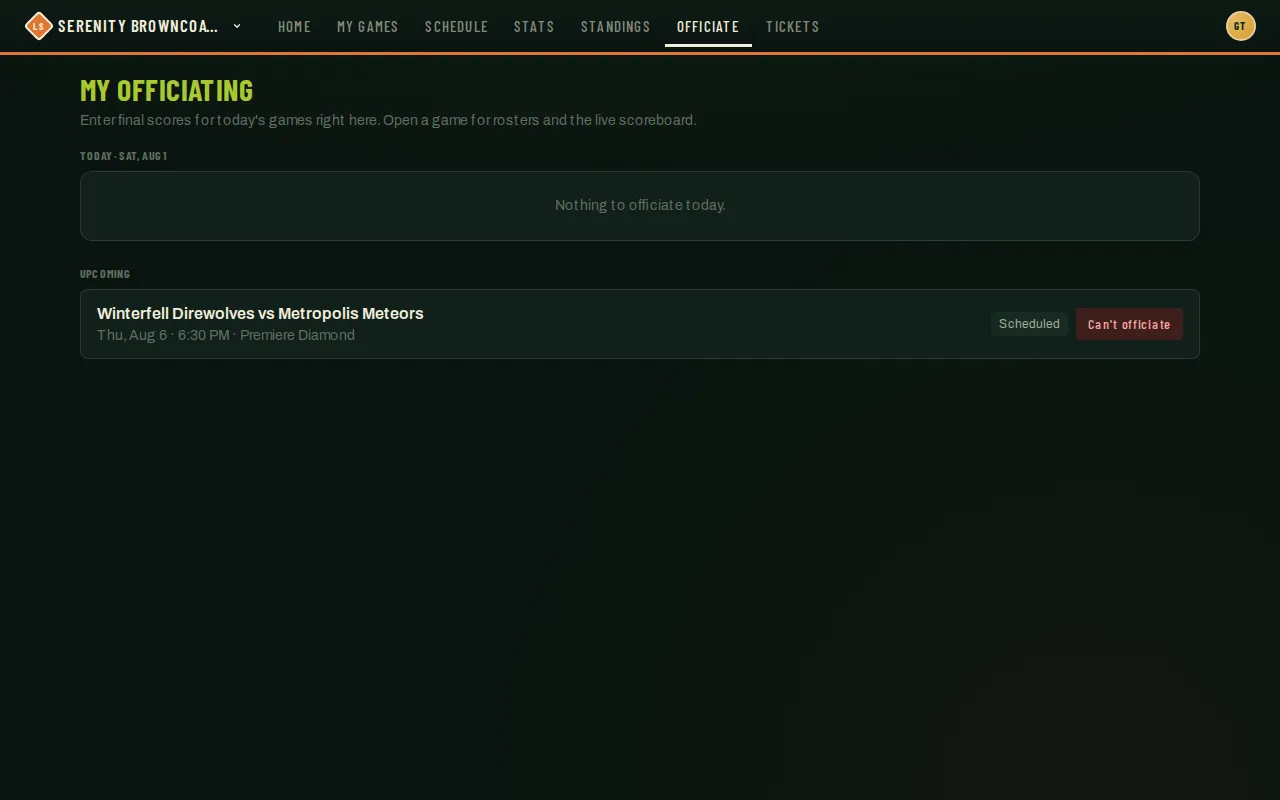
Your officiating dashboard — My Officiating — is the one place every game you’ve been assigned to shows up, sorted into three groups so it’s obvious what needs your attention right now versus later.
Who can do this
Section titled “Who can do this”Anyone holding the official role for at least one organization. You only ever see your own assignments.
- Open Officiate from the navigation. Your assignments are split into three sections:
- Today — anything scheduled for today gets a full card right on the dashboard, with score-entry fields built in so you don’t have to open the game separately.
- Needs a score — a past game you were assigned to that still doesn’t have a final score. It gets the same inline card as Today so you can back-fill it without hunting for it.
- Upcoming — everything further out shows as a compact row: matchup, date/time, field, and a status chip.
- Each entry shows the matchup, date, time, field (when one’s set), and a status chip — Scheduled, Reported (one team already submitted a score), Disputed (the two teams’ scores don’t match), Final, or Declined.
- Tap a row to open the full game view — rosters for both sides and the live scoreboard — covered in Entering & overriding scores.
- Every card also carries a Can’t officiate button if you need to back out — see the same article for when to use it instead of just leaving a game unscored.
- Nothing assigned yet? The dashboard just says so plainly instead of showing an error.
Good to know
Section titled “Good to know”- The three sections are date-driven, not manual — a game moves from Upcoming to Today automatically as its date arrives, and into Needs a score if it passes with no final entered.
- A Declined assignment stays visible on your dashboard as a record, but its score-entry form is replaced with your decline reason — you’re not expected to act on it further.
- This demo account currently has one upcoming assignment, which is why Today and Needs a score are both empty here — they fill in exactly the same way once a game’s date arrives.