Divisions & AI division suggestions
Splitting teams into fair divisions (D1 the strongest, working down) is one of the harder judgment calls in running a league. Suggest Divisions asks the AI to propose a split based on real signals — skill history, win/loss record, gender mix, age, roster turnover — and shows you the reasoning. It never moves a single team on its own: you review the suggestion on screen and, if it’s a fresh season with an undecided pool of teams, commit it yourself.
Who can do this
Section titled “Who can do this”Organization admins and site admins. League admins can view and run Suggest Divisions too, as long as they admin every league the run touches — but committing a holding pool is an org-wide move: that step always needs an organization (or site) admin, even for a league admin who covers every affected league.
- Open Organization → Insights in the admin sidebar, then pick a Sport and a Division — this loads the skill, record, gender, and roster data the suggester and the rest of the page share.
- Find the Suggest Divisions card and click 2 or 3 to ask for that many divisions. The AI reads the same data you’re looking at on the Stats page — team skill index, self-reported skill level, record and run differential, age, roster size, gender mix, and new-vs-returning counts — and proposes a
D1/D2/D3split, with D1 always the strongest and (when the split can’t be even) D2 getting the extra teams. - The result renders right on the page as a table per division — team, players, skill, record, and the AI’s stated reason for each placement. Nothing about a team or league is changed by generating a suggestion; it’s advisory until you act on it.
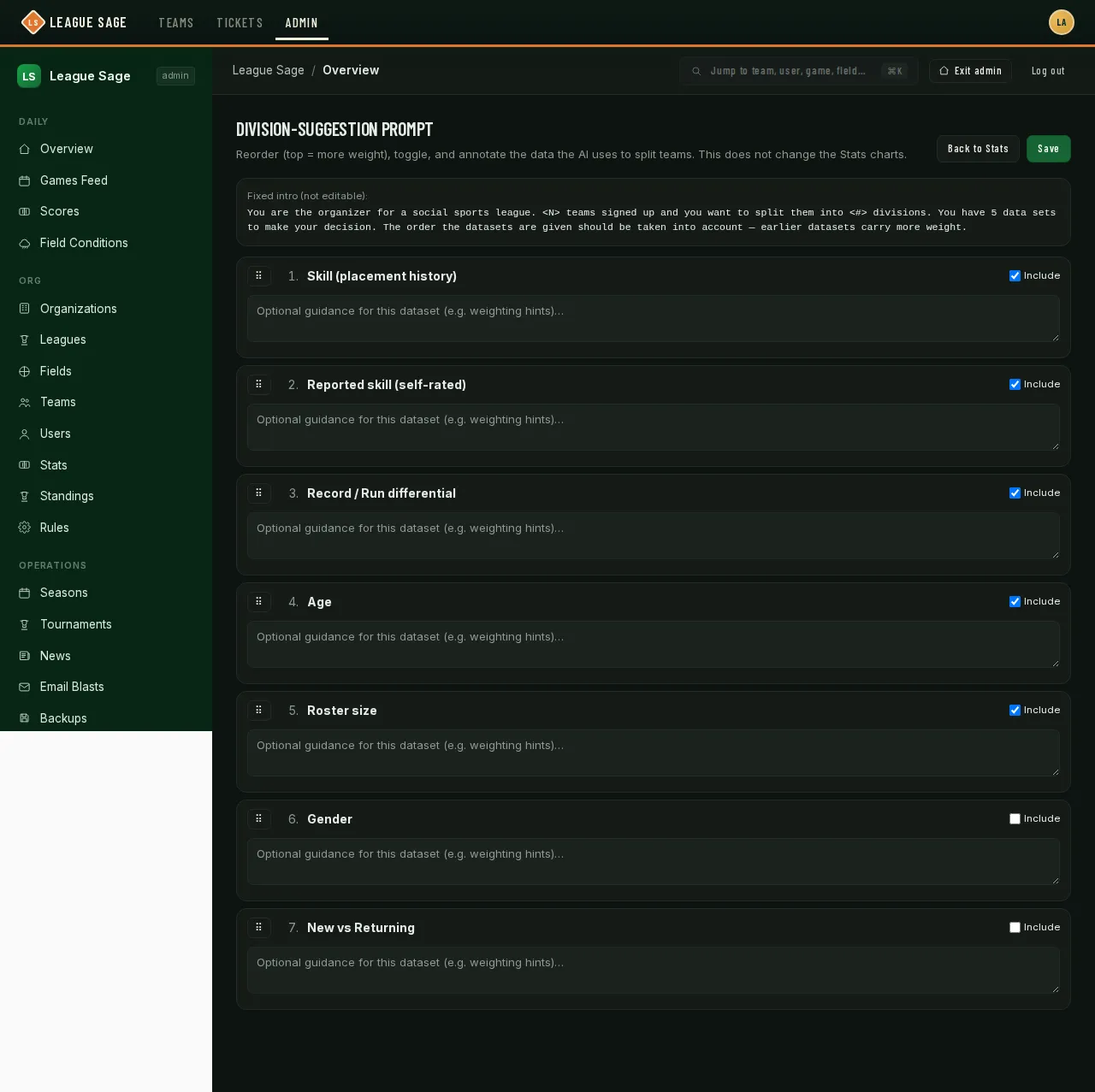
- Want to weight the inputs differently for your organization? The card’s Edit link opens the prompt editor shown above — drag a data set up to give it more weight (order = weight, top carries the most), untick Include to drop one entirely, or add a short guidance note per data set. View Prompt shows you the exact text the AI will see before you run it.
- A staged suggestion also feeds two companions on the same page: an always-on Division Chat for swap questions (“if Team X moves to D2, who should swap the other way?”), and the Schedule Report’s division coloring and cross-division flags.
- For a season that started with just a sport chosen and no divisions decided — teams register into a temporary holding pool instead of a real league — open that season’s Scheduling tab once registration closes and use the Assign Divisions panel: run Suggest Divisions scoped to the pool, map each suggested division to one of your organization’s standing leagues, then Commit. Committing moves every mapped team into its real league and retires the now-empty holding pool; any team you leave unmapped just stays in the pool for a later pass.
Good to know
Section titled “Good to know”- Suggestions are never persisted or auto-applied — re-run Suggest Divisions any time, and re-running after your data changes is expected (the Schedule Report card will prompt you to re-analyze if a newer suggestion is on screen).
- Skill index comes from placement history (a team starts at 100; wins and losses in past tiered seasons move it up or down), separate from the self-reported Beginner/Social/Competitive level players set on their own profile.
- Committing a holding pool is blocked if a schedule already exists for that season, if any target league is outside your organization or the wrong sport, or if a target league already has other active teams from a different season — that last case asks you to confirm before proceeding.
- The prompt editor’s changes only affect what the AI is told; they don’t touch the charts on the Stats page itself.